

What is a Consolidated Invoice Report?
A Consolidated Invoice Report is a detailed financial document that summarises all invoices issued within a selected date range. It’s especially useful for reviewing billing activity over time, making it easier to track costs, manage client accounts, and ensure accurate VAT reporting
You can filter the report by client or job type, allowing for more focused analysis—ideal for finance teams, project managers, and anyone who needs clarity on where money is being spent or earned.
What Information Does It Include?
The report provides a line-by-line breakdown of each invoice and job, including:
Invoice Number – A unique identifier for each invoice
Client Name – The individual or company being invoiced
Client Purchase Order (PO) – The client’s own reference for the transaction
Issue Date – The date the invoice was generated
Site – The location where the job or service took place
Job Number – A unique reference code for each job
Job Title – A brief summary or title of the job
Job Description – A more detailed explanation of the work carried out
Job Type – The category the job falls under (e.g. installation, maintenance)
Net Cost – The cost before VAT is applied
VAT Amount – The amount of VAT charged on the invoice
Total Cost – The total amount payable, including VAT
Net Total – The combined value of all net costs within the report
VAT Total – The total VAT charged across all invoices
Below, you will see an example of what the report will look like when generated.
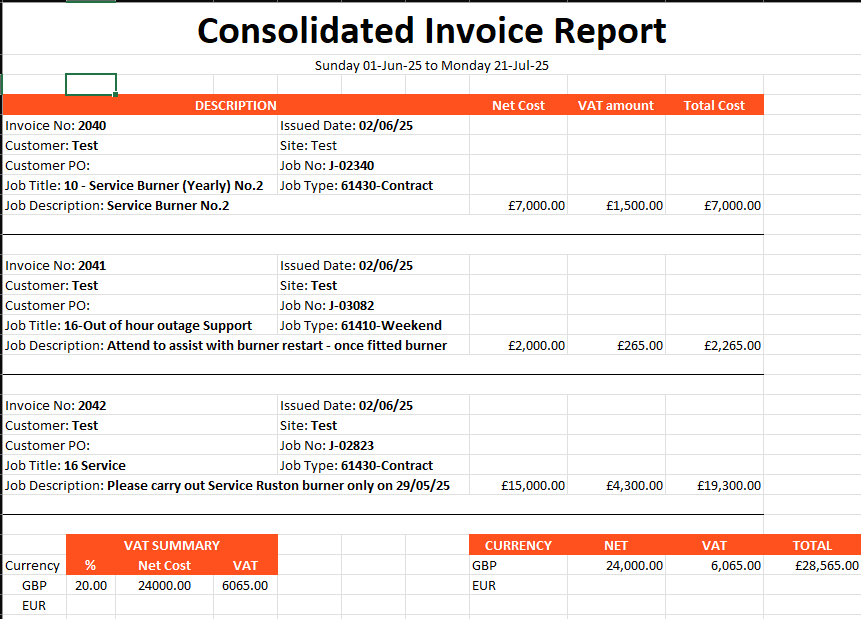
VAT Summary Section
This dedicated section gives a clear view of how VAT is calculated across all included invoices. It outlines:
The VAT rates applied (e.g. 20%, 0%)
The net amounts associated with each rate
The corresponding VAT totals
This is especially useful when preparing VAT returns or reconciling accounts.
Currency and VAT Handling
The report also highlights the currency used and clearly identifies how VAT has been applied, supporting international transactions and compliance with HMRC or other tax authorities.
For further guidance or support please contact the WorkPal support team either by email at support@workpal.app or by telephone on 02890271777